
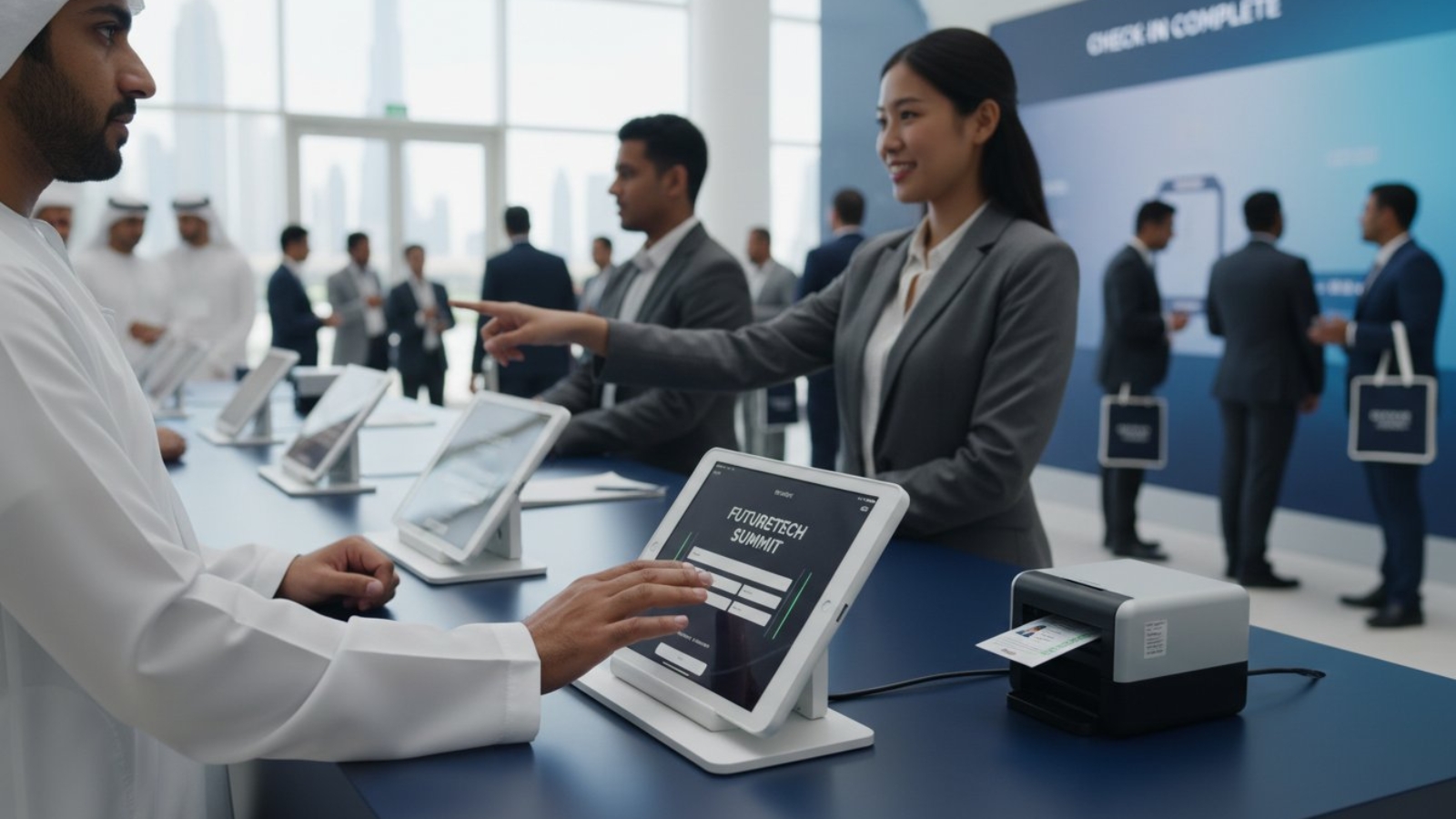
Did you know that 50% of events in 2026 are trailing behind their typical registration pace? This recent Freeman report highlights a growing urgency for organizers to maximize efficiency from the very first interaction. You’ve likely felt the stress of watching a queue grow while a single device fails or the Wi-Fi drops. It’s frustrating when technology meant to help becomes a bottleneck. Choosing the right iPad kiosk rental for event registration isn’t just about hardware; it’s about creating a stable, secure, and professional gateway for your attendees.
We understand that your reputation is on the line at the check-in desk. This guide provides a professional roadmap to streamlining your arrival process, leveraging automation that can reduce processing times by as much as 75%. You’ll learn how to integrate high-performance iPads with reliable badge printers and robust network solutions to eliminate technical friction. We will explore the latest M4 and M5 models, essential security protocols like GDPR and CCPA compliance, and the logistical steps needed to ensure your registration ecosystem remains unfazed by peak-hour crowds.
Key Takeaways
- Understand why the registration desk acts as a critical digital gateway that dictates the overall sentiment and success of your event.
- Learn to select the optimal hardware for an iPad kiosk rental for event registration, ensuring your devices remain secure in tamper-resistant enclosures.
- Discover how a hybrid staffing model balances self-service efficiency with personalized human support to accommodate diverse attendee needs.
- Mitigate the risks of venue Wi-Fi failure and physical device theft by implementing dedicated connectivity solutions and secure locking mechanisms.
- Identify how professional onsite installation and national delivery services ensure your registration ecosystem is fully operational before the first guest arrives.
The Role of iPad Kiosks in Modern Event Registration
The registration desk is more than a logistical necessity; it’s the digital gateway to your entire event. Choosing an iPad kiosk rental for event registration ensures that first impressions are professional and efficient. These initial moments often dictate an attendee’s sentiment for the rest of the day. A smooth, tech-forward entry signals a well-organized production, while a cluttered desk suggests chaos. Modern Interactive Kiosk Technology has transformed this entry point from a manual bottleneck into a streamlined, automated experience. By moving away from static paper logs to real-time digital tracking, organizers gain immediate visibility into their guest list. This transition is essential for high-stakes corporate gatherings where punctuality and professional image are non-negotiable.
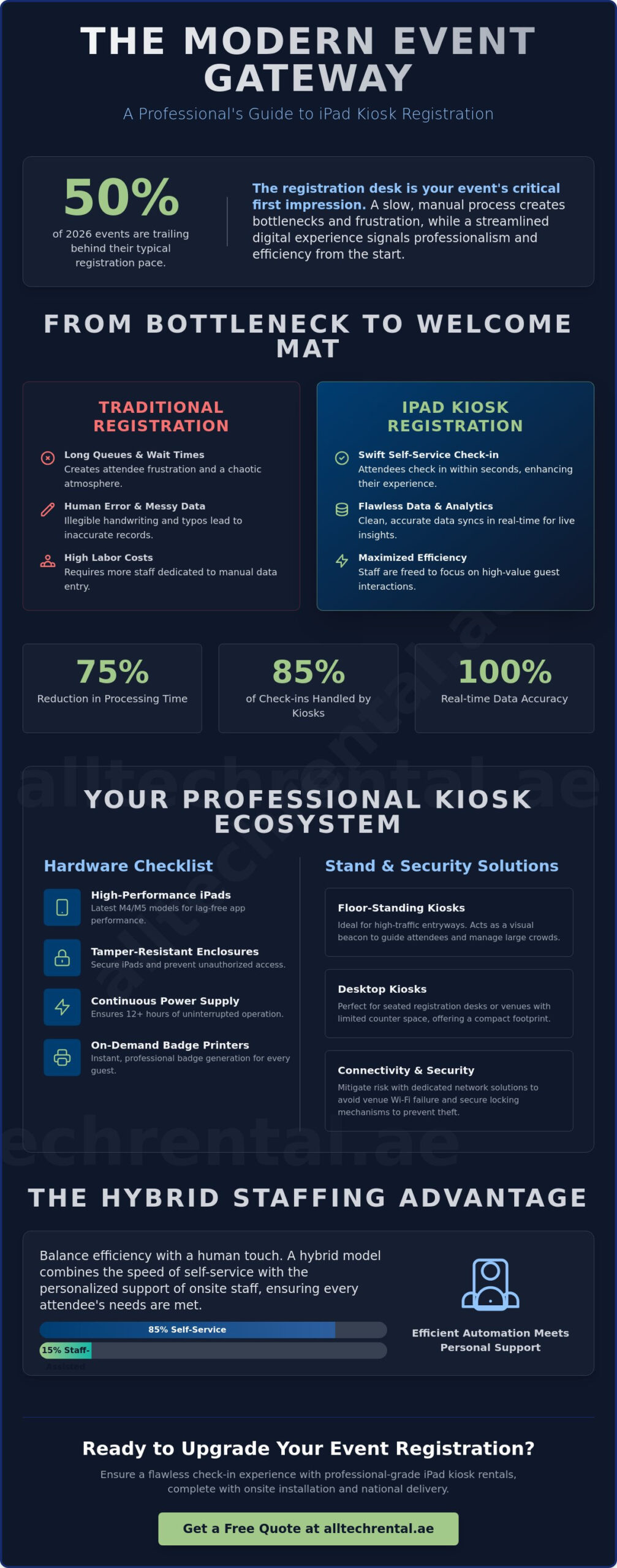
Implementing an iPad kiosk rental for event registration allows your team to focus on hospitality rather than data entry. Automation reduces processing time by as much as 75%, according to industry research. This efficiency doesn’t just save time; it lowers labor costs by reducing the number of staff required to manage traditional queues. Human error, such as mistyping a name or misplacing a physical form, is virtually eliminated. The result is a reliable system that empowers your team to act as proactive guides rather than reactive clerks. It’s a sophisticated way to handle high-volume traffic without the stress of manual oversight.
Enhancing Attendee Experience
Attendees appreciate autonomy and speed. Intuitive touch-screen interfaces allow guests to check themselves in within seconds, removing the anxiety of long waits. This high-tech aesthetic complements corporate branding, providing a sophisticated atmosphere from the moment a guest walks in. When paired with badge printer rentals, these kiosks facilitate instant badge generation. This removes the need for searching through pre-printed piles, ensuring every guest receives a professional, accurate badge immediately.
Data Accuracy and Real-time Analytics
Manual forms often lead to illegible handwriting and data loss. Digital kiosks ensure every entry is clear and formatted correctly. This data syncs instantly with event management software, providing a live feed of attendee arrivals. Organizers can monitor peak arrival times in real-time. This insight is invaluable for optimizing future event staffing and understanding flow patterns. With up to 85% of event check-ins handled independently by self-service kiosks, your data remains clean, secure, and actionable for post-event reporting.
Essential Hardware for a Professional Kiosk Setup
Selecting the right hardware is the foundation of a successful check-in experience. While software drives the process, the physical components of an iPad kiosk rental for event registration determine the system’s reliability and speed. For high-stakes events in 2026, we recommend utilizing the latest iPad Pro models featuring M5 processors or the iPad Air equipped with the M4 chip. These devices offer the necessary processing power to handle complex registration apps without lag, ensuring every interaction remains fluid and responsive; for those interested in purchasing these models or other IT equipment for permanent use, you can read more about professional hardware options.
Security is another critical pillar of a professional setup. When you secure an iPad kiosk rental for event registration, it’s essential to use tamper-resistant enclosures. These specialized cases protect the home button and power ports, preventing unauthorized access or accidental app closures by attendees. Beyond physical protection, these enclosures often house integrated charging cables to maintain continuous operation. Power management is vital for long exhibition days; your kiosks must stay active for 12 or more hours without interruption. This level of reliability is part of the disruptive technologies in the event industry that are raising attendee expectations for seamless service and sophisticated digital interactions.
Floor-Standing vs. Desktop Kiosks
The layout of your venue dictates the best stand type for your needs. Floor-standing kiosks are the preferred choice for high-traffic entryways. They act as visual beacons, guiding attendees toward the registration area and providing wayfinding assistance. Their height makes them easily accessible for standing guests, which is ideal for large conferences. Conversely, desktop stands are better suited for seated registration desks or environments where counter space is limited. If you’re managing a compact exhibition booth, wall-mounted options can save valuable floor space while still providing full registration functionality.
Badge Printers and Scanners
A kiosk is only as effective as the peripherals it supports. Integrating high-speed thermal printers allows for instant name tag production, significantly reducing the “wait-to-badge” time that often creates queues. For the fastest throughput, QR code scanners enable a “scan-and-go” check-in process. This allows attendees to scan a pre-sent digital ticket and receive their badge in seconds. For maximum reliability, we recommend hardwiring these peripherals via a LAN connection or using stable Bluetooth protocols. If you’re planning a large-scale event, you can rent iPad kiosks and badge printers as a synchronized package to ensure total hardware compatibility and a hassle-free setup process.
Self-Service vs. Staffed Registration: Which is Right?
Deciding between a self-service model and a staffed registration desk is a strategic choice that directly impacts your event’s flow. Your decision should begin with an analysis of your attendee demographics. Tech-savvy audiences, such as those at software conferences or creative festivals, often prefer the speed and autonomy of an iPad kiosk rental for event registration. These guests value a “scan-and-go” experience that lets them bypass traditional queues. Conversely, traditional corporate audiences or high-level VIPs might expect a personal greeting and a high-touch handshake. Understanding these expectations ensures you don’t trade hospitality for efficiency where it matters most.
The most effective strategy for 2026 is often a hybrid approach. This involves deploying a bank of self-service kiosks supported by a small team of floor assistants. Research indicates that self-service kiosks can handle up to 85% of event check-ins independently. By shifting the bulk of the workload to hardware, you can significantly reduce the number of dedicated desk staff required. This cost-benefit advantage allows you to reallocate your budget toward professional event staff who can roam the floor, proactively assisting guests rather than being tethered to a laptop. It’s a “safe pair of hands” philosophy that ensures no guest feels abandoned by the technology.
Edge cases are the primary source of stress at any registration desk. Walk-in registrations and lost confirmation emails can quickly create bottlenecks if your system isn’t prepared. A professional iPad kiosk rental for event registration should be configured with a “manual lookup” feature. This allows guests to find their records using only their name or company, resolving issues in seconds without requiring a staff member to intervene. This level of preparation ensures your entry point remains a smooth, friction-free environment even during peak arrival hours.
The Self-Service Model
For large-scale conferences and festivals, maximizing throughput is the priority. Unattended kiosks empower attendees to take control of their own arrival, which significantly reduces “queue anxiety.” To succeed here, your software UI must be exceptionally simple. Large buttons, clear instructions, and a visible progress bar are essential. When guests feel confident in the interface, they move through the process faster, allowing your registration area to handle hundreds of arrivals per hour with ease.
The Staff-Assisted Model
VIP events and intimate corporate gatherings benefit from a staff-assisted model where iPads are used as mobile check-in tools. Instead of standing behind a bulky counter, your team can use handheld iPads to greet guests at the door or in the lounge. This creates a premium, concierge-style experience. It also ensures that any technical troubleshooting happens instantly; if a guest has a complex registration question, a trained staff member is already there with the device in hand to provide an immediate solution.
Ensuring Success: Connectivity and Security Logistics
A flawless check-in process depends on more than just high-performance hardware. Connectivity is the lifeblood of any digital registration desk. While many organizers rely on local venue Wi-Fi, this often leads to significant delays during peak arrival hours. Venue networks are frequently congested as hundreds of attendees attempt to connect their personal devices simultaneously. When you secure an iPad kiosk rental for event registration, you must treat connectivity as a mission-critical component rather than an afterthought. A dropped connection at the desk doesn’t just slow down queues; it stops your data synchronization and badge printing entirely.
Digital security is equally vital for maintaining a professional environment. We recommend using “Kiosk Mode” or Guided Access to lock each iPad to your specific registration application. This prevents attendees from accidentally exiting the app or accessing the device’s settings. Before the event begins, your team should ensure all software is pre-loaded and tested for offline capabilities. If the network momentarily fluctuates, a well-configured app will continue to collect data locally and sync it once the connection is restored. This proactive approach removes the stress of technical instability and ensures a consistent experience for every guest.
The Necessity of Dedicated Event Wi-Fi
To prevent registration downtime, it’s essential to separate check-in traffic from general attendee Wi-Fi. Using a dedicated network ensures that your kiosks always have the priority bandwidth they need for real-time database lookups. Implementing 4G or 5G failover systems provides an additional layer of reliability; if the primary line fails, the system automatically switches to a cellular signal. Professional Event Wi-Fi Services are the backbone of digital check-in because they guarantee the bandwidth required for real-time data synchronization. This infrastructure ensures your iPad kiosk rental for event registration remains fully operational regardless of venue network conditions.
Physical Hardware Protection
Physical security is a priority in busy public spaces like exhibition halls and hotel lobbies. High-quality kiosk stands feature key-locked enclosures that prevent unauthorized removal of the tablet. For added security, Kensington cable locks can tether the entire stand to a fixed point in the registration area. Stability is also a logistical concern; weighted bases for floor stands prevent accidental tipping in high-traffic zones. Finally, ensure your setup uses hidden cabling. Tucking power cords inside the stand neck prevents accidental disconnections and maintains a clean, professional aesthetic. If you’re ready to secure your entry points, you can rent secure iPad kiosks that come pre-configured for maximum reliability and physical safety.
National iPad Kiosk Solutions with All Tech Rental
Choosing All Tech Rental means securing a partner that understands the high-stakes nature of national exhibitions and corporate summits. Our extensive hardware inventory supports events of every scale, from intimate executive roundtables to massive industry trade shows. We provide more than just an iPad kiosk rental for event registration; we deliver a fully managed logistical solution designed to eliminate technical friction. National delivery and professional onsite installation ensure your registration area is fully operational long before the first attendee arrives. This “safe pair of hands” approach allows your planning team to focus on high-level strategy while we handle the technical execution.
To complement this high-end registration setup, organizers can look to production experts like Northern Signal AV Ltd. for their main event needs. Their specialization in high-resolution LED walls and concert audio systems ensures that the technical excellence of your check-in area is mirrored on the main stage.
Customization is a core part of our service. We offer custom branding options for your kiosks, ensuring the hardware matches your event’s visual identity. Beyond the digital interface, we provide lanyard printing services to create a cohesive and professional look for every guest. Our team remains unfazed by tight deadlines or complex requirements, providing the stability and reliability required for prestigious national gatherings. By integrating hardware, logistics, and branding, we transform the registration desk into a sophisticated touchpoint that reinforces your brand’s authority.
A Complete Technology Ecosystem
Successful registration requires a synchronized environment where every device communicates flawlessly. We specialize in pairing our iPad kiosk rental for event registration with high-performance Badge Printer Rental services for instant credentialing. To ensure total peace of mind, you can also access Professional Event Staff for technical management and flow control. This ecosystem integrates seamlessly with your existing event management platforms, ensuring that data flows accurately from the kiosk to your central database without manual intervention.
Why National Organizers Trust Us
Our reputation is built on proven reliability across major national exhibition centers and hotel venues. We don’t leave success to chance; every device undergoes meticulous pre-event testing and configuration at our facility. We pre-load your specific apps, security settings, and branding so the hardware is ready to perform the moment it’s powered on. We also offer flexible rental terms, ranging from single-day hire for local seminars to long-term solutions for multi-city roadshows. This adaptability, combined with our commitment to excellence, makes us the preferred choice for organizers who demand a hassle-free, professional registration experience.
Future-Proofing Your Event Check-In
A professional registration desk is the foundation of a successful attendee experience. The integration of high-performance iPads with secure, tamper-resistant enclosures creates a reliable gateway for your guests. Success in 2026 requires more than just hardware; it demands a synchronized ecosystem of dedicated Wi-Fi, instant badge printing, and expert logistical oversight. By implementing an iPad kiosk rental for event registration, you eliminate the risks of long queues and technical failure, allowing your team to focus on high-level hospitality.
All Tech Rental provides the stability and technical authority needed for large-scale national productions. Our team offers pre-configured hardware for immediate use, alongside national UAE delivery and professional onsite setup. We also provide onsite technical staffing to manage your registration flow and ensure every device performs perfectly throughout your event. If you’re ready to transform your arrival process into a seamless, high-tech experience, Get a Quote for Your National Event Registration Setup today. We look forward to ensuring your next event starts with total confidence and efficiency.
Frequently Asked Questions
What is the best iPad model for an event registration kiosk?
The iPad Pro with the M5 chip is currently the most powerful model for event kiosks. It handles high-resolution graphics and complex database lookups with ease. If your software requirements are less intensive, the iPad Air with the M4 processor offers a reliable and efficient alternative. Both options provide the stability and battery life required for a professional, high-traffic registration environment.
Can iPad kiosks work without a stable Wi-Fi connection?
Kiosks can function offline if your registration software is configured to store data locally on the device. However, real-time data synchronization and badge printing require a live network connection to remain accurate across multiple entry points. To ensure a seamless experience, we provide dedicated event Wi-Fi services that prevent the common connectivity failures often associated with shared or unstable venue networks.
Do the iPad stands come with security locks to prevent theft?
Every kiosk enclosure features a secure key-lock system to prevent unauthorized access to the tablet. We also provide Kensington cable locks to tether the stands to fixed structures in your venue. These security measures, combined with weighted floor stand bases, ensure that your equipment remains safe and stable in high-traffic exhibition halls, hotel lobbies, or busy convention centers.
How many kiosks do I need for an event with 1,000 attendees?
We recommend one kiosk for every 150 attendees to maintain a brisk check-in pace. For an event with 1,000 guests, a setup of seven kiosks provides the necessary capacity to handle peak arrival surges without creating long queues. This configuration also offers redundancy; if one device requires a reboot, the other units can comfortably manage the attendee flow without causing delays.
Can I brand the iPad kiosks with my company logo?
Yes, your iPad kiosk rental for event registration can be customized with vinyl wraps featuring your company logo and event colors. Digital branding is also available through the registration app’s user interface. This ensures that the technology serves as a professional extension of your brand, creating a cohesive and high-end visual experience for every attendee as they arrive at the desk.
What happens if the hardware fails during the event?
We mitigate the risk of failure through meticulous pre-event testing and the inclusion of backup hardware for every rental. If a device fails, our technicians can perform an immediate swap with a pre-configured unit to keep your lines moving. This proactive approach ensures that technical hurdles don’t disrupt your registration timeline or negatively impact the attendee experience during high-stakes arrival hours.
Do you provide onsite technical staff to manage the kiosks?
We offer professional event staff who are trained to manage the entire registration ecosystem. These onsite technicians handle the physical setup, monitor network stability, and assist attendees with the check-in process. Having a dedicated technical team ensures that any minor issues are resolved instantly, allowing your own staff to focus on greeting VIPs and managing other critical event logistics.
Is it possible to print badges directly from the iPad kiosk?
Our kiosks are designed to work in perfect synchrony with high-speed badge printers. Once an attendee confirms their details on the iPad, the system triggers the printer to produce a professional name tag immediately. This integrated iPad kiosk rental for event registration setup eliminates the need for manual badge searching and significantly accelerates the arrival process for all your participants.
Add a Comment